

Apple has been slowly phasing out or removing the physical SIM tray in newer iPhones. Some models within the newest lineup expected in India may arrive eSIM-Only, functioning only on embedded SIM technology. For many Indian users, it may feel like a big step, especially since public awareness of eSIM technology is still dwarfed by old SIM technology. So what does this mean for you, and how do you get ready to switch over to a tray-less iPhone? Let’s break it down step by step.
What Is a ESIM
• Digital SIM (eSIM): The term stands for “embedded SIM”. It is a small chip that is soldered into your iPhone’s motherboard. Instead of putting in a plastic card your mobile plan is stored virtually on a chip.
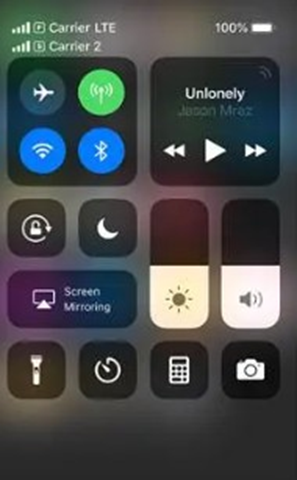
• Multiple profiles: The modern iPhone can store multiple carrier profiles and be active at the same time. Therefore, you can use dual-SIM, without the need for a slot.
• Activation process: You do not need a card. To activate the eSIM, you either do that by scanning a QR code from your carrier, allowing Apple to take care of “Carrier Activation” during set up, or by converting your physical SIM to eSIM in iPhone settings.
How eSIM works
An eSIM (embedded SIM) is essentially a tiny programmable chip embedded into your phone, whereas SIM cards are removable plastic cards that we are accustomed to using. For an eSIM we don’t physically insert or change SIM cards. Instead the mobile operators transfer your network details digitally. Here are the steps of how it works:
| Step | What Happens | User Action Required |
| 1. Activation Request | You choose a mobile plan from your carrier (online, app, or store). | Request eSIM profile. |
| 2. Profile Download | The carrier sends a digital SIM profile via QR code or direct push to your phone. | Scan QR code or confirm download. |
| 3. Secure Storage | The eSIM chip inside the iPhone stores this profile securely. | No manual action. |
| 4. Network Connection | Your iPhone connects to the carrier just like a physical SIM would. | Start using services instantly. |
| 5. Multiple Profiles | eSIM can hold more than one carrier profile at once. | Switch profiles in Settings. |
Indian Carriers and eSIM Support
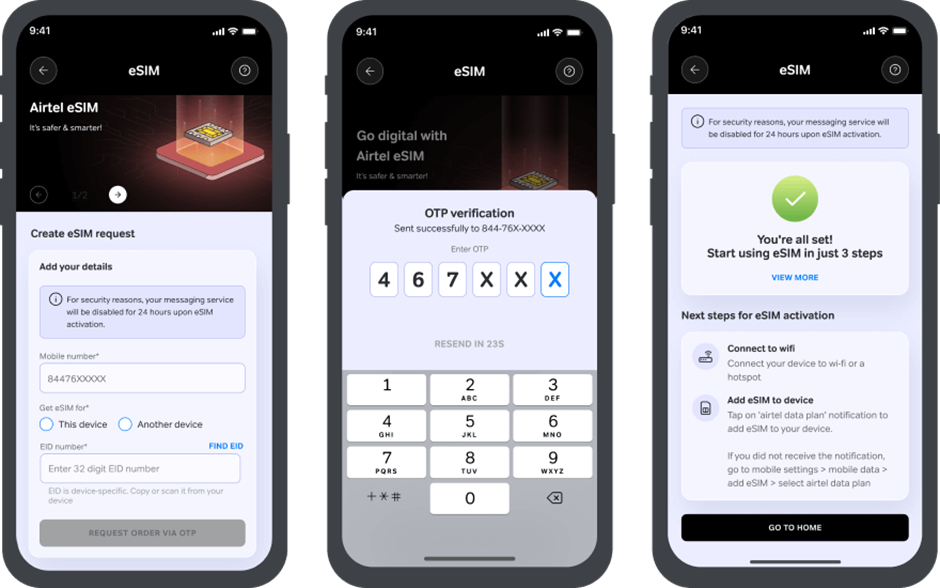
The bright side: India is entirely ready for this transition. Each of Airtel, Jio, and Vi (Vodafone Idea) offer embedded SIM cards for iPhones, with their own unique support options, often programmed into an app or QR code.
Quick Reference: How Carriers Handle It
| Carrier | Activation Method (iPhone) | Notes |
| Airtel | QR code sent via email; step-by-step guide on Airtel’s website | Profile activates instantly once downloaded. |
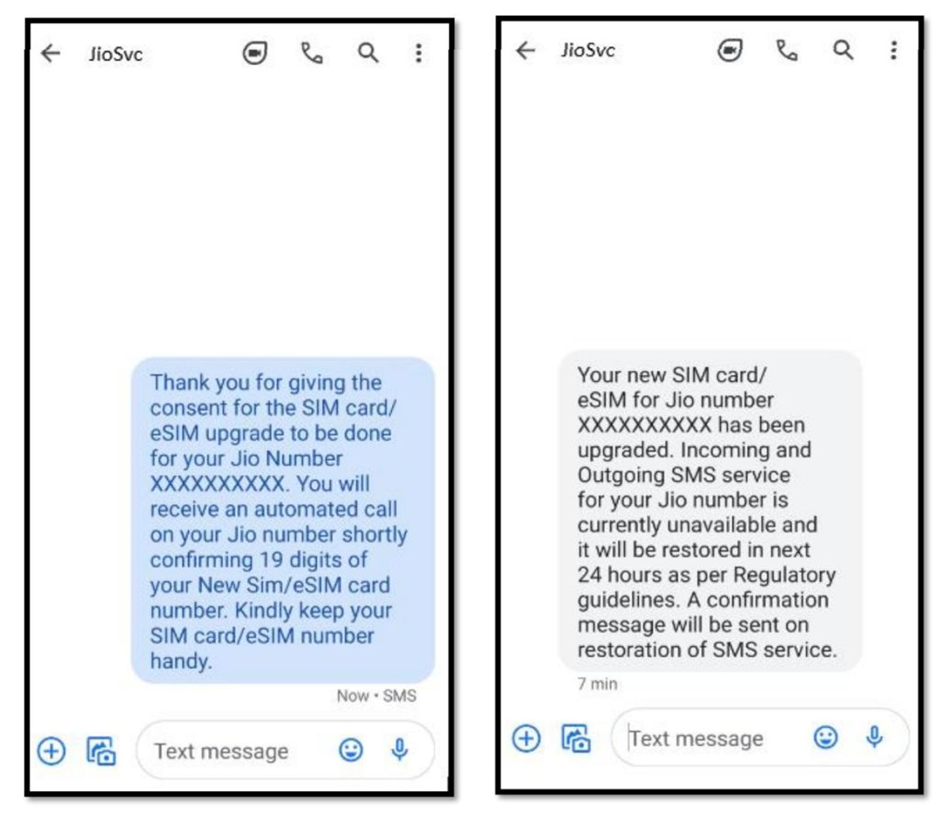
| Jio | Request via Jio flow (includes IVR verification call) | If you miss the IVR call, send RECALL to 199 for another attempt. |
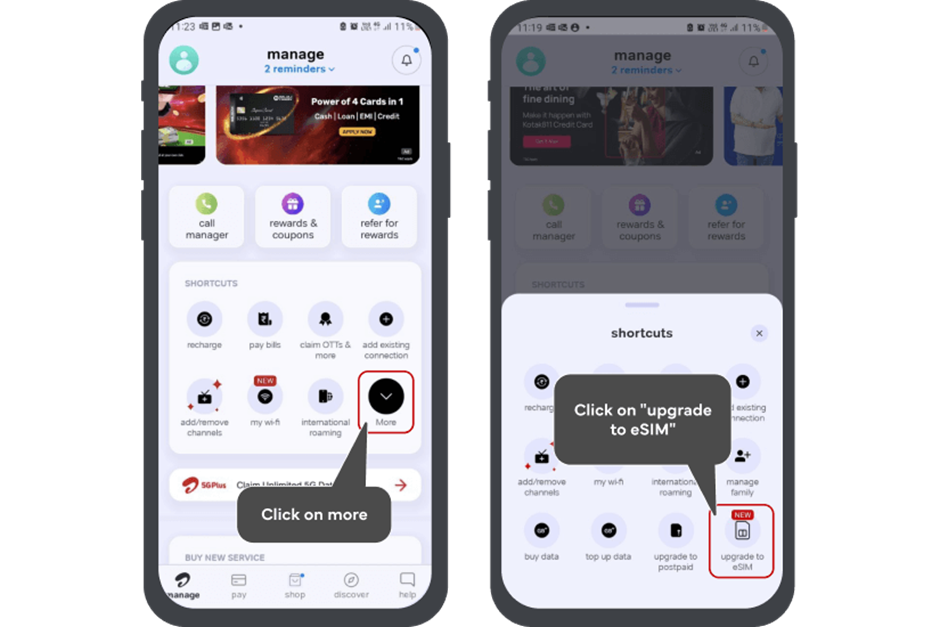
| Vi | Request inside the Vi app → Help → Service Request → Activate | Enter EID + OTP; profile delivered via push notification or QR. |
📌 Tip: Apple’s India carrier support page lists all features (5G, Wi-Fi calling, VoLTE) for each operator—worth checking before activating.
Why eSIM Are a Big Deal
Benefits
1. More secure:
Thieves can’t just steal your SIM because there isn’t a removable card. Although fraud is never unrealistic, SIM-swap scams are much more difficult to commit.
2. Two numbers, one device:
You can have a professional and personal line running simultaneously on one device.
3. Travel freedom
If you are travelling abroad, generally, you can purchase a prepaid travel profile online and get started instantly within minutes (like Airalo, Nomad or Holafly) anywhere in the world without wasting time looking for kiosks.
4. Cleaner design
eSIM means fewer moving parts. Less parts, marginally better water resistance and opens up space for other components such as larger batteries.
Challenges of eSIM
1. First time set up requires connectivity
To activate, you typically will need Wi-Fi or mobile data. Keep a hotspot handy.
2. Swapping phones is not instant
You can’t swap a card into another handset; you will need to transfer or re-issue the profile from your carrier aside from unmounting the NFC tag.
3. Limited offline support
In rural India, where shopkeepers are generally selling physical SIM cards, the transfer will feel more hassle-like.
Migrating from Plastic SIM to eSIM
On iPhone, there are three main paths:
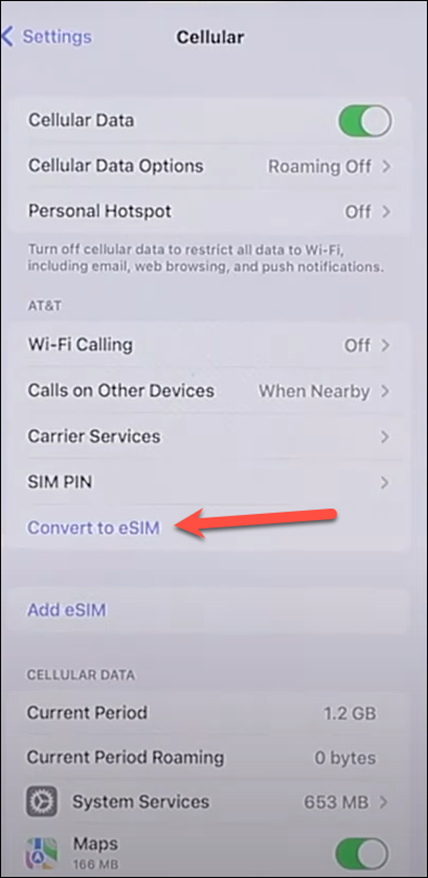
Convert your existing card in Settings
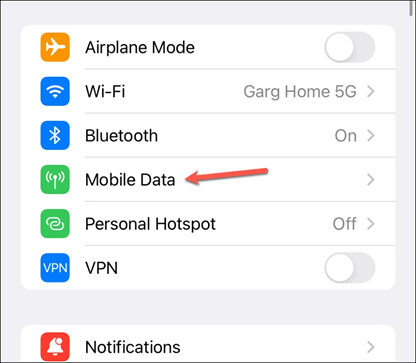
- Go to Settings → Cellular/Mobile Data → Convert to eSIM.
- Follow the prompts if your carrier supports it.
Scan a QR code from your carrier
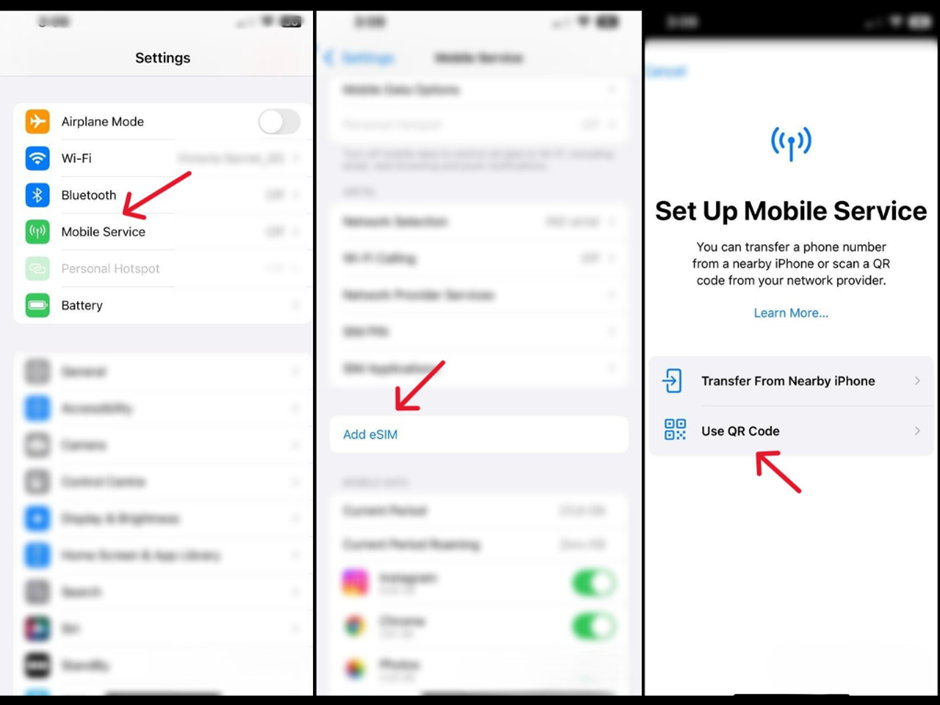
- Go to Settings → Cellular → Add eSIM → Use QR Code.
- Scan the emailed QR or one provided at a store.
Carrier Activation at purchase
- At Apple Stores or authorized resellers, the carrier can assign your plan to the built-in chip during setup.
⚠️ Keep your old SIM active until you confirm that calls, SMS, and data work on the new profile.
Dual Numbers on eSIM-Only iPhones
With eSIM, iPhones have two active profiles. You can name each line (e.g., “Work” and “Personal”), choose which one is for data, and choose to control roaming.
Everyday Use Cases
• Professionals with only one phone that need both work and personal numbers.
• Students with an India line adding a cheap plan abroad easily while then traveling there for study visits.
International Travel from India-Why eSIM is good to go
For travelers, life becomes easier with eSIMs:
- Order tickets online and in advance: Companies such as Airalo, Nomad and Ubigi can offer regional or global packs.
- No airport kiosk: Land, scan QR and turn on your data.
- Keep your Indian number alive: Great for OTPs, bank alerts etc.
💡 Pro tip: Route data through the travel plan and keep the Indian line for calls/SMS. Avoiding large roaming charges.
Privacy and Security related to eSIM
- eSIM is Safer than plastic: This solution removes the ability to easily steal or clone a SIM (there is no removable card).
- Carrier checks help: the issuance or transfer of eSIMs can require KYC-type verification, OTP verification, or, IVR verification.
- Always use good practices:
- Add a PIN or password to your carrier account.
- Enable alerts for SIM-change (for some operators)
- If transferring sensitive logins, use the authenticator instead of SMS for 2FA.
eSIM Troubleshooting and Edge Cases
• Did you not receive the QR email?
It’s possible that it went to your spam messages. Carriers (such as Jio) also allow you to re-trigger the flow.
- Your activation failed?
You can double-check the EID (32 digit number found in Settings). Then, use the carrier’s app submit again.
- The SMS is delayed after the switch?
Some operators take additional time to fully re-provision the SMS service. Wait a while before you choose to escalate.
- Will you be switching phones at a later date?
You can use Apple’s Quick Transfer or ask your carrier for a re-issued profile. As always, keep your old phone on until the new one is activated.
Step-by-Step Mini Guides
A) Converting a SIM to eSIM
- Connect your iPhone to Wi-Fi.
- Go to Settings → Cellular → Convert to eSIM.
- Follow prompts and confirm.
- Test calls, SMS, and data before removing your old SIM.
B) Adding via QR Code
- Request activation in your carrier’s app or at a store.
- On iPhone: Settings → Cellular → Add eSIM → Use QR Code.
- Scan, confirm, and label your plan.
C) Example: Vi In-App
- Open Vi app → Help → Service Request → Activate.
- Enter your EID, verify with OTP.
- Download the profile directly to your iPhone.
D) Example: Jio Flow
- Complete IVR verification call (+91-22-3507-2222).
- Once approved, the profile activates automatically.
- Missed the call? SMS RECALL to 199 for a retry.
Should You Switch to eSIM Now?
| Situation | Recommendation |
| Need two numbers on one phone | Great fit—run both profiles side by side. |
| Travel often abroad | Use travel data packs; keep India line for OTPs. |
| Live in an area with patchy digital support | Check if your carrier’s online flow works well for you. |
| Frequently swap phones | Learn carrier transfer steps, or consider models that still have a tray. |
What eSIM Means for India
1. Carriers are ready: Airtel, Jio, and Vi support this technology already.
2. Dual-line life is easier: Professionals and students can manage their personal and work all in one phone.
3. Goodbye to SIM hunting while abroad: Indians traveling to the Gulf, Europe, or Southeast Asia can simply add a temporary plan and done.
4. Learning required: There will be a learning curve to activation and transfers, but, it’s easy from the first experience.
FAQs
Q1: Can I have two numbers active as eSIM?
Yes, iPhones without a tray can run two profiles simultaneously.
Q2: Will my old SIM card work?
Not if iPhone has no SIM slot. You will need to convert it through your provider.
Q3: What if I lose my phone?
Contact your carrier and request to suspend or re-issue your eSIM. Make sure to lock/erase via Find my iPhone as well.
Q4: Will banking OTPs work for eSIM?
Yes. The number is still the same. Just be aware of roaming overseas.
Q5: Is the activation of an eSIM free?
Generally yes – there is no fee for a monthly charge, but you will have usual plan/roaming fees.
Q6: Can I transfer it to my next iPhone?
Yes, either using the Quick Transfer feature by Apple, or by requesting a new profile from your provider.
Final Word
The move to eSIM technology isn’t going to be denied. For Indian users it might feel like the end of an era – no longer will we be pulling plastic cards out of kiosks – but the positives are obvious: better security, easier travel, and no-hassle dual-line functionality. With a number of major carriers already on board, most users won’t have too hard of a transition. The trick is to learn the set-up steps once, keep your operator’s steps handy, and get excited for the future of mobile connectivity.
Stay updated – follow us for more tips | Inkontrend


