

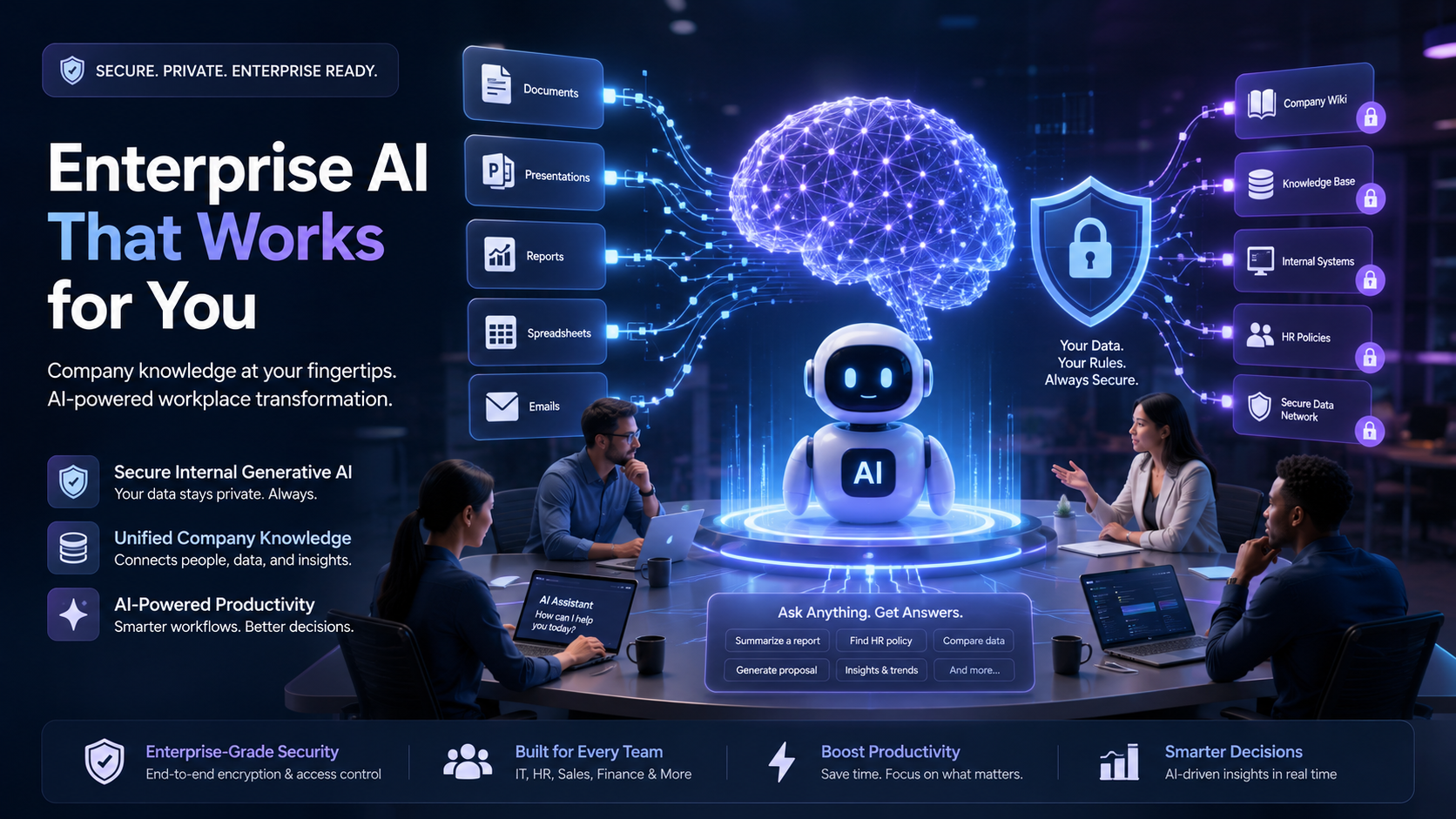
Generative AI assistants are set to become a critical enabler for enterprises aiming to boost productivity without sacrificing data security. This blog delves into motivations for enterprises to invest in secure AI, explores the pivotal role of Retrieval-Augmented Generation (RAG), navigates the build versus buy decision, and shares best practices for implementing AI assistants that gain user acceptance and trust.
Table of Contents
The Real Reason Companies Are Building Generative AI Assistant
Ask most executives why they are developing an internal AI assistant, and they will give you the productivity pitch: It allows them to draft documents and reports more quickly and accurately and get answers to their questions faster. While these are all undeniably valid reasons, they fail to capture the true benefit of an AI assistant, and they also fail to understand its most pressing issue.
The more compelling reason is occurring regardless of whether executives want it to happen. According to a 2026 opinion survey of office workers conducted by Wakefield Research, 34% had entered customer data into public artificial intelligence systems, and 31% had disclosed financial information or sensitive business strategies. Two-thirds of them had used artificial intelligence tools at work even though they knew their employers prohibited such usage. In another research, 67% of US workers have been using AI tools without their organization’s approval on a regular basis, including employees who provided access to their personal accounts to an AI assistant to perform tasks faster.
This is not theoretical or hypothetical. Engineering teams at samsung semiconductors famously had their proprietary source code pasted into ChatGPT by an engineer while trying to debug an issue (thereby putting trade secrets into a consumer facing product with no contractual obligation for data security). And one industry report found that the fraction of prompts containing proprietary information sent to chatGPT has risen nearly threefold since 2023, and exceeded a third of total enterprise prompts sent to the model.
So the realistic starting point for any internal search assistant project is not “how do we boost productivity.”, but “our users are already leaking data to unsafe models, we need to give them something they control”.
Build vs. Buy: What the Data Actually Says
Here’s where a bunch of companies making internal AI development decisions go wrong. They assume that building internally is the responsible, adult thing to do while outsourcing is a cheap hack for firms that lack engineering firepower. Which is not what the data says at all.
Across different analyses, 67 percent of initial vendor-led or vendor-assisted AI installations had successful outcomes, compared to around 33 percent for in-house development, according to the review of studies at MIT. The analysis of first-time corporate development projects revealed that they were, on average, 7.8 months late and only 26 percent completed on time, compared to 3.9 months for outsourced builds and 44 percent of those finished on schedule.
That does not mean that developing an in-house system is a wrong decision. Rather, it is a more resource-heavy and time-consuming one than many internal pitches for AI assistance suggest, and should be undertaken deliberately, not by default. The realistic budget projection for a first-year project which would produce a production-grade internal AI assistant would already exceed $300,000 to $500,000 with salaries, infrastructure, and engineering costs taken into account, with another $150,000 to $250,000 required annually for maintenance, retraining, and monitoring.
KPMG’s notes on this particular topic are also worth remembering; if a readily available option offers more than 80% of the required functionality, it should be used, and if it offers less than 60%, it will usually take more effort to retrofit an existing product to your needs than to build the required functionality from scratch.
The strategy that is proving to be most effective in practice is something like a hybrid between build and buy. The most pragmatic approach is to rent the model, the infrastructure, the compliance layer: the core from OpenAI, Anthropic, Google and AWB Bedrock, and then build on top of it, own the document retrieval logic, permission architecture and internal processes. No need to own the model. No need to build the thirty percent that is already there.
The Architecture Nobody Explains Well: RAG
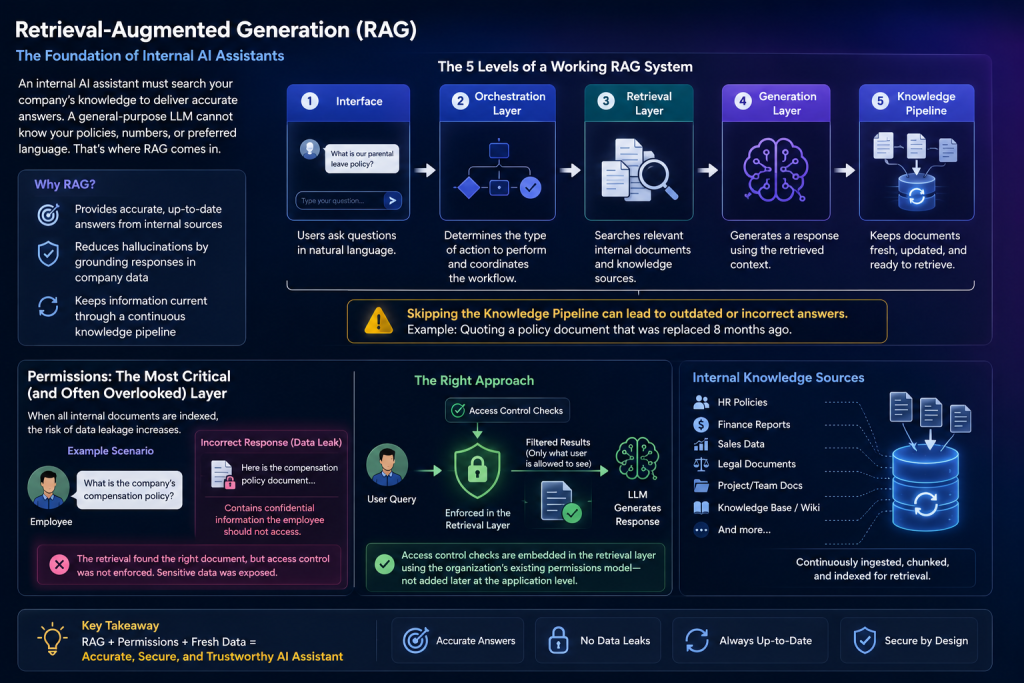
Most internal assistants use retrieval-augmented generation, or RAG for short, which is considerably less intimidating than it sounds. In any case, whatever the model is called, the principle is straightforward; if you want your assistant to be able to provide accurate answers to questions about internal company matters, it has to be able to search for relevant information itself. A general-purpose language model, no matter how advanced, cannot know off the top of its head what the current policy on parental leave is in the company where it was deployed, what sales figures your team is aiming to achieve this quarter, or what specific language the legal department prefers in contract drafts.
A working system generally has five levels, including the interface in which users pose their queries, the orchestration layer that determines the type of action to perform, the retrieval level that searches through the documents, the generation layer that forms the response, and a knowledge pipeline that ensures that the documents are up to date. Getting the first four levels right and skipping the fifth will result in an assistant that can confidently quote from a policy document that was replaced eight months ago.
The one aspect that is often forgotten in any vendor’s presentation and poses the biggest risk to the project if not addressed is the permissions. When all of the internal documents are indexed in the knowledge base, it becomes a lot easier to accidentally leak some sensitive information.
The problem is demonstrated by an example in which an employee asks the assistant about the company’s compensation policy. The response generated correctly quotes an HR document, which the employee should not have been able to access. In the scenario, there was nothing wrong with the retrieval process since it found the relevant document. Instead, the issue was that the access control policies were not properly considered. Researchers note that the implementation of access control checks must be embedded in the retrieval layer, which means that it should utilize the permissions model that is already present in the system as opposed to being implemented at the application level and added later.
What a Working Deployment Looks Like
Cisco’s internal AI assistant is one of the straighter cases of an internal tool in action; they have it to fulfill the need stated in the prompt, to keep employees from using third party (and therefore insecure) AI assistants. Cisco’s IT department created the tool with the knowledge that it would have to keep the data that it processed internal, rather than feeding it to some sort of external training database.
The result was that 73% of test users felt more productive when using it, and that its effect on their work habits led to them saving an average of five hours a week. A significant number, though hardly unreasonable given the opportunity to make one’s work easier and faster, but only through the specific design choices that focused on security first, not convenience or accessibility.
Security was placed before essentially everything else in the creation of this assistant, and that has given Cisco a tool that they can trust and that they know fulfills its design parameters. Placing security considerations at the beginning of a project, rather than as an afterthought, leads to better programs designed around security, rather than with security tacked on after the fact, and programs that users feel safe utilizing in their daily work.
What Employees Actually Use AI Assistant For
Once established, the best use cases for an AI assistant are likely to be narrower and more specific than one might expect from the pitch:
- Policy and HR lookups: benefits information, PTO balances, expense rules, etc.
- Internal document search: finding the right precedents, approvals, or templates in shared drives
- First draft writing: emails, internal documentation, or other materials where the rote work of writing has value
- Meeting and thread summarization: getting to the meat of an important conversation
- Code and technical support: an assistant trained on your internal code base and technical documentation, not a public model
Note that none of the above involve judgment or carry significant risk of exposure. Those are appropriate for well-run systems, which will usually have hard-coded rejections or require escalation for sensitive questions.
Even if you have the right tool, roll-out and change management are likely to be critical. In one survey of over 1300 employees, 70% said they received no formal training on responsible AI use, and 44% worked at companies with no published policies at all. It is no surprise that shadow AI adoption exists in many organizations when employees don’t know what tools are approved, or what the rules are, they make up their own.
A practical rollout sequence looks something like this:
- Audit what exists, find out, without punishment, what shadow tools your employees are already using and why; to understand what the internal assistant needs to be able to replace.
- Choose the layering build; pick a base provider and scope the retrieval, permissions, and integration layer according to the narrowest set of use cases that will solve your top two or three problems.
- Design permissions before content: work out who sees what before you index anything.
- Pilot with a team and a task, not a company and a product; so that you learn about the failures of the tool before you scale its harms.
- Train and publish the policy at the same time as you launch the tool, not six months later when no one remembers why they signed up.
- Measure outcomes, not outputs; don’t count heads or page views, but whether tickets are being resolved faster, or drafts are being composed in less time.
Bottom Line
An internal generative AI assistant is less a productivity play and more a data control measure that incidentally boosts productivity and therefore should be approached in precisely the opposite order as most tech departments would think. Build the permission infrastructure before anything else, buy the infrastructure you don’t need to purchase, and don’t measure the easiest metric, but the one most difficult to obtain that will make your life objectively better.
FAQs
1. What is an internal generative AI assistant?
An internal generative AI assistant is a secure AI-powered tool that can be accessed by internal users. It differs from an industry-facing system in that it is connected to knowledge bases and business systems while applying specific security and access controls over sensitive data.
2. What’s the point of having an internal AI assistant instead of using public tools?
There are already many public AI tools available for employees to use, which poses a risk to companies since confidential business information can easily be leaked. An internal assistant offers the same functionality as external tools but provides greater security and control of sensitive data while following corporate policies.
3. Do you recommend developing an internal AI assistant in-house or buying an off-the-shelf solution?
There is no one-size-fits-all answer. The best solution depends on an organization’s needs and resources. It is important to consider if it would be more cost-effective to adopt third-party AI models and cloud infrastructure and develop proprietary tools in-house to meet specific requirements.
4. What is retrieval-augmented generation, and why is it essential for enterprises?
Retrieval augmented generation allows an AI assistant to access external knowledge bases and use the information to inform responses to user inputs. This is important for enterprises as it enhances the accuracy and relevance of information while also reducing hallucination by relying on trusted internal sources.
5. What are some use cases for an internal AI assistant?
Common use cases include human resources and policy questions, enterprise search, email and document composition, meeting summarization, and code generation. Enterprises want to ensure assistants follow security and governance guidelines while also being able to provide the same level of convenience as consumer tools.


