

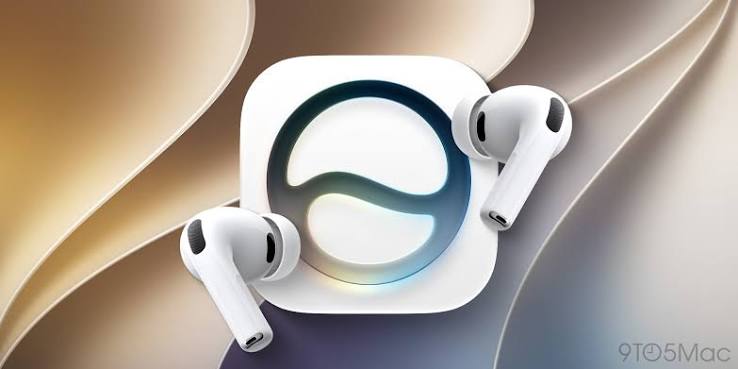
For years, AirPods have mostly been about sound — noise cancellation, spatial audio, call quality. But with iOS 27, Apple is quietly turning its most popular accessory into something closer to a genuine AI companion. Thanks to the arrival of Siri AI, a smarter conversational assistant, alongside a redesigned settings experience and expanded real-world features, So are set for their biggest functional upgrade in years — without a single new piece of hardware required for most of it.
Table of Contents
- What Is Siri AI, and Why Does It Matter for AirPods?
- How Siri AI Actually Works Through AirPods
- World Knowledge: Siri Finally Understands the Real World
- Personal Context: Siri That Knows What You Mean
- A More Conversational Siri
- Live Translation Gets Smarter Too
- GymKit Integration: AirPods as a Fitness Tracker
- The Redesigned AirPods Settings Interface
- Which AirPods Actually Support These Features
- Why Apple Is Doing This Through iPhone, Not AirPods Hardware
- What This Means for the Future of AirPods
- Conclusion
- FAQs
What Is Siri AI, and Why Does It Matter for AirPods?
Siri AI is Apple’s significantly overhauled version of its long-running voice assistant, arriving as part of iOS 27 this fall. Unlike previous versions of Siri, which were often criticized for being limited to narrow, pre-programmed commands, Siri AI is built to feel like a genuine conversational assistant — closer to ChatGPT-style AI tools than the Siri most iPhone users have grown used to over the past decade.
For AirPods specifically, this matters because Siri has always been the primary way people interact with their earbuds hands-free. Every “Hey Siri” request, every “what’s the weather,” every reminder set on the go has run through Siri. Upgrading that underlying assistant means AirPods, without any new physical hardware, suddenly gain access to a dramatically more capable version of the exact same voice interface people already use every day.
How Siri AI Actually Works Through AirPods
It’s worth being clear about how this actually functions from a technical standpoint. Siri AI doesn’t run directly on the AirPods themselves — instead, it works through a connected iPhone running iOS 27 with Apple Intelligence enabled. When you’re wearing the product and make a request, that request is processed by Siri AI on your paired iPhone, and the response is delivered back through your product, just as it always has been for standard Siri commands.
This distinction matters for setting expectations. Apple isn’t turning AirPods into a standalone AI device that works independently of an iPhone — that kind of fully autonomous AI wearable is still further down Apple’s roadmap. What iOS 27 does instead is make the assistant AirPods already rely on dramatically smarter, without requiring people to buy new earbuds or wait for next-generation product hardware.
World Knowledge: Siri Finally Understands the Real World
One of the most significant upgrades bundled into Siri AI is something Apple calls “World Knowledge.” In practical terms, this means Siri can now reference real, up-to-date information from online sources to answer far broader questions than it previously could. Where older versions of Siri were often limited to a narrow set of built-in facts or simple web searches that dumped you into Safari, Siri AI is designed to directly answer detailed questions — everything from recipe instructions to recommendations for places to visit to fairly open-ended, random questions people might think to ask throughout the day.
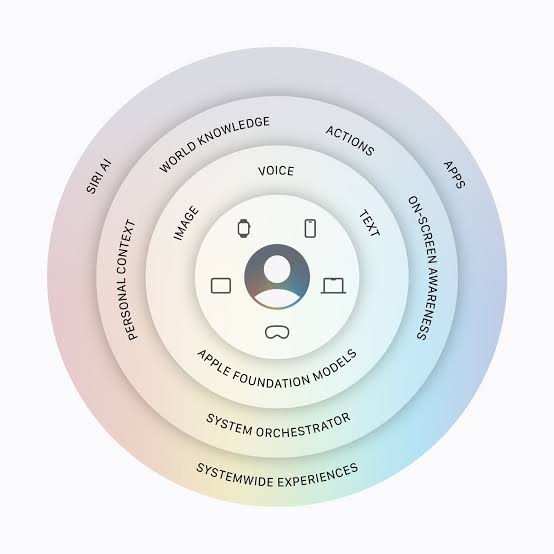
For someone wearing AirPods, this transforms what a quick “Hey Siri” moment can accomplish. Instead of pulling out your phone to look something up, World Knowledge means genuinely detailed, conversational answers can now happen entirely through your earbuds, without ever needing to glance at a screen.
Personal Context: Siri That Knows What You Mean
Alongside World Knowledge, Siri AI introduces a feature Apple describes as “Personal Context” — the ability for Siri to understand and reference information that’s specific to you, rather than treating every request as a completely generic query. According to Apple, this means Siri AI can find relevant answers to what you’re looking for just by asking, without needing to specify every detail explicitly each time.
In everyday terms, this is the difference between having to say “What time is my 3 PM meeting with Raj on Thursday” and being able to ask something far more natural, with Siri filling in the context from your calendar, messages, or other personal data on your device. For this product users specifically, this kind of contextual understanding is especially valuable, since voice is often the only interface available — you can’t glance at a screen to clarify a vague question the way you might on an iPhone.
A More Conversational Siri
Beyond the two headline capabilities above, Apple has also rebuilt Siri’s basic conversational tone. According to Apple’s own description, Siri AI is designed to support “entirely new capabilities” for open-ended conversation — letting people ask follow-up questions, brainstorm ideas for work or creative projects on the go, and engage in natural, back-and-forth dialogue rather than a single command followed by a single response.
This conversational shift is arguably just as important as the specific new features, since it changes the basic interaction pattern people have relied on for years. Older Siri exchanges tended to be transactional: one request, one answer, conversation over. Siri AI is designed to feel more like an ongoing dialogue, which suits the product particularly well, given how often people wear them continuously throughout a commute, workout, or work session where a longer, evolving conversation with an assistant is genuinely more useful than a single one-off command.
Live Translation Gets Smarter Too
While Siri AI is the headline feature, it’s not the only upgrade AirPods users are getting this fall. Live Translation, which Apple first introduced with iOS 26, is also expanding. The feature lets the product automatically translate what someone nearby is saying into your preferred language in real time, using on-device processing to keep conversations private.
With iOS 27, Apple is expanding Live Translation’s language support significantly, adding Italian, Japanese, Korean, and both simplified and traditional Mandarin Chinese by the end of the year. Live Translation can be triggered several different ways — by pressing and holding both products stems simultaneously, by asking “Siri, start Live Translation,” through the Translate app, via Control Center, or through a customizable Action button shortcut on supported iPhones. During calls made through the Phone app or FaceTime, translations are spoken aloud in real time directly through your product, while Active Noise Cancellation is used to lower the original speaker’s volume, making the translated audio easier to focus on.
It’s worth noting that Live Translation currently requires an iPhone 15 Pro or later with Apple Intelligence enabled, and isn’t available in all regions — notably, it’s not currently supported in mainland China.
GymKit Integration: AirPods as a Fitness Tracker
For AirPods Pro 3 owners specifically, iOS 27 brings a genuinely new fitness capability through expanded GymKit integration. This feature lets you tap your iPhone against a GymKit-compatible treadmill and select a workout type — such as an indoor walk or indoor run — turning your iPhone and AirPods into a functional substitute for an Apple Watch during gym workouts.

This effectively gives Apple Watch-style workout tracking, including real heart-rate data pulled from AirPods Pro 3’s built-in sensors, combined with precise treadmill metrics like incline, distance, and pace pulled directly from the machine itself. For anyone whose Apple Watch battery dies, gets left at home, or who simply doesn’t own one, this offers a real, if partial, fitness tracking alternative using hardware many people already carry with them daily. Apple has been steadily building toward this kind of iPhone-centric fitness tracking for a while — AirPods Pro 3 was the first model to include heart-rate sensors at all, following earlier experiments with Powerbeats Pro 2 — and GymKit integration represents the clearest payoff of that groundwork so far.
The Redesigned AirPods Settings Interface
Beyond the AI and fitness upgrades, iOS 27 also brings a significant redesign to the settings menu itself, aimed at making the growing list of features easier to actually find and use. The new interface, accessible under Settings > AirPods, reorganizes controls into clearer categories: Audio & Routing, Hearing Health, Controls & Gestures, Live Translation, Accessibility, Battery, Find My, and Privacy.
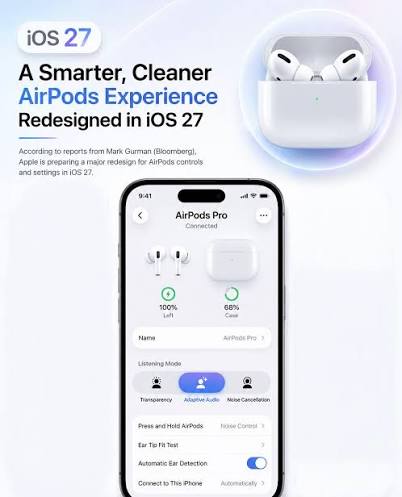
Quick-access controls for Transparency, Noise Cancellation, and Adaptive modes remain easily accessible at the top of the interface, and Apple has added a volume slider directly into this same screen for faster adjustments. Previously, features like Hearing Health, Call Controls, and gesture settings were buried in expanded menus that could feel cluttered; the new structure separates these into their own dedicated sections, making the settings experience noticeably more organized as have they accumulated more capabilities over the years.
Which AirPods Actually Support These Features
Not every AirPods model gets the full suite of iOS 27 upgrades. Siri AI functions on the product through a connected iPhone, so broadly speaking, any model paired with a compatible iPhone running iOS 27 and Apple Intelligence can take advantage of the new conversational assistant. Live Translation, however, has narrower requirements — it’s supported specifically on AirPods 4 with Active Noise Cancellation, AirPods Pro 2, AirPods Pro 3, and AirPods Max 2, and requires an iPhone 15 Pro or later.
GymKit integration and heart-rate-based fitness tracking are currently exclusive to AirPods Pro 3, since that’s the first and so far only AirPods model equipped with the necessary heart-rate sensors. Meanwhile, the redesigned settings interface and general UI improvements apply broadly across supported product models, regardless of whether they include the more advanced AI or health-tracking features.
Why Apple Is Doing This Through iPhone, Not AirPods Hardware
There’s a clear strategic logic behind Apple’s approach here. By routing Siri AI and most of these new features through the iPhone rather than requiring new product hardware, Apple is able to deliver a major functional upgrade to the vast majority of its existing product user base — not just people willing to buy a brand-new pair. This mirrors Apple’s approach with Live Translation last year, which likewise arrived as a software update rather than a hardware-exclusive feature tied to a single new product release.
This strategy also reflects a broader pattern in how Apple has approached wearables in recent years — leaning on the iPhone as the processing hub for increasingly sophisticated features, rather than trying to cram all that computing power into smaller devices like Apple handy products. It’s a pragmatic approach, though it does mean the most advanced features remain gated behind owning a sufficiently recent, Apple Intelligence-capable iPhone, even if your product themselves are fully compatible.
What This Means for the Future of AirPods
Taken together, these updates suggest AirPods are steadily evolving from a purely audio accessory into something closer to a genuine everyday AI companion — one that can hold real conversations, translate languages on the fly, and track a workout, all without requiring you to pull out your phone. Apple has been characteristically cautious about calling this an “AI wearable” outright, and for good reason: without an iPhone nearby, the product still can’t do any of this on their own.
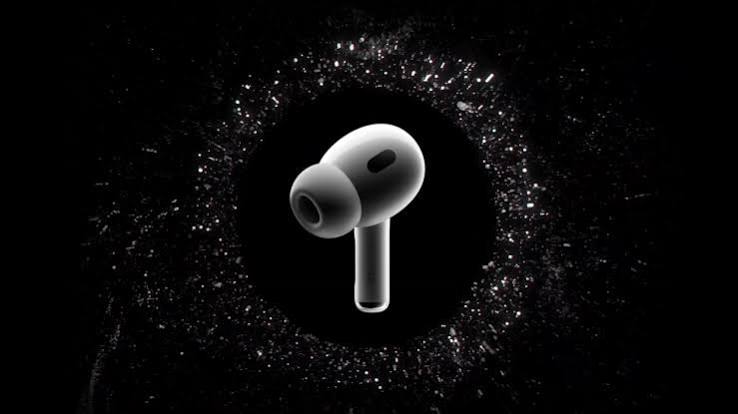
But the direction of travel is clear. Each major iOS release over the past two years has added a new layer of capability to the product — Live Translation with iOS 26, and now Siri AI, expanded translation support, and GymKit integration with iOS 27. If that pattern continues, it’s not hard to imagine product eventually gaining even more independent functionality, particularly as rumors continue to circulate about future product models potentially including built-in cameras as part of Apple’s broader AI wearables push.
Conclusion
iOS 27 represents one of the more substantial upgrades in recent memory, even though it doesn’t require buying any new hardware. Between a genuinely smarter, more conversational Siri, expanded Live Translation language support, GymKit-powered fitness tracking, and a cleaner settings interface, existing product owners are getting a meaningfully more capable pair of earbuds simply by updating their software this fall. It’s a reminder that, increasingly, Apple’s most interesting AI advances aren’t necessarily showing up as flashy new hardware — they’re showing up quietly, through the devices people already have in their ears every day.
FAQs
1. What is Siri AI, and how is it different from regular Siri?
Siri AI is Apple’s overhauled voice assistant launching with iOS 27, offering more conversational responses, access to real-time “World Knowledge” from online sources, and better understanding of personal context, compared to the more limited, command-based Siri of previous years.
2. Do I need new AirPods to use Siri AI?
No. Siri AI works through any AirPods connected to a compatible iPhone running iOS 27 with Apple Intelligence enabled — no new AirPods hardware is required for the core Siri AI functionality.
3. Which AirPods support Live Translation?
Live Translation is supported on AirPods 4 with Active Noise Cancellation, AirPods Pro 2, AirPods Pro 3, and AirPods Max 2, when paired with an iPhone 15 Pro or later running the latest iOS with Apple Intelligence enabled.
4. What is GymKit integration on AirPods Pro 3?
GymKit integration lets AirPods Pro 3 owners tap their iPhone against a compatible gym machine, like a treadmill, to track workouts using real heart-rate data from the AirPods’ built-in sensors, combined with the machine’s own metrics.
5. When is iOS 27 releasing?
iOS 27 is expected to release this fall, following its unveiling at WWDC 2026, bringing Siri AI and the other AirPods upgrades to compatible devices.
6. Can AirPods work with Siri AI without an iPhone nearby?
No. Siri AI processes requests through a connected iPhone rather than running independently on the AirPods themselves, meaning an iPhone with Apple Intelligence enabled must be nearby for these features to work.


